Just press Fn+Caps will lock/unlock the Fn key
No tooltip will indicate the change of state


20/03/2015
How to keep LIFE, sleep and work in harmony
Hi everyone
In this previous post I list my values, sharing is among those.
I feel particularly proud of my the balance and the harmony of my life and I want to share how you can achieve it in a dedicated blog.
The first post is here and it's not yet available to the public, because I need your help, as privileged editors. Please review and comment for the blog to start with the right foot.
http://frankcontrepois.com/2015/03/how-to-keep-life-sleep-and-work-in-harmony/
Don't be shy, comment on typos; graphics; why you'll (or will not) follow it; which topics you'd like to see discussed.
"The moving thinking tank" will continue to exist as a representation of all the ideas, technicalities and curiosities I've in my brain. There will be a post a week as usual.
Thank you
Frank
PS: John, please follow the new blog
In this previous post I list my values, sharing is among those.
I feel particularly proud of my the balance and the harmony of my life and I want to share how you can achieve it in a dedicated blog.
 |
| By Jaime Fearer – https://www.flickr.com/photos/wageslaves/ |
The first post is here and it's not yet available to the public, because I need your help, as privileged editors. Please review and comment for the blog to start with the right foot.
http://frankcontrepois.com/2015/03/how-to-keep-life-sleep-and-work-in-harmony/
Don't be shy, comment on typos; graphics; why you'll (or will not) follow it; which topics you'd like to see discussed.
"The moving thinking tank" will continue to exist as a representation of all the ideas, technicalities and curiosities I've in my brain. There will be a post a week as usual.
Thank you
Frank
PS: John, please follow the new blog
13/03/2015
Receipe: Pasta with Salmon
Lets have a change, this evening I've got a subliminal message from my wife: "Tonight you cook, I bought pasta and salmon". So here we go for all of you a recette just tested
Come on guys lets prepare a very simple dish for your lady! 10 minutes, one boiling pan, one frying pan and some steps.
Initially I wrote the post with 11 steps to prepare the pasta then discovered that bbc has a receipe in 4 steps. I'm including both, mine is for 2 with less onion and allow for more mistakes.
Frank's style
BBC
Come on guys lets prepare a very simple dish for your lady! 10 minutes, one boiling pan, one frying pan and some steps.
Initially I wrote the post with 11 steps to prepare the pasta then discovered that bbc has a receipe in 4 steps. I'm including both, mine is for 2 with less onion and allow for more mistakes.
Frank's style
- 200g of pasta. Tradition would say "penne" but take what you have
- 200g of salmon. Smoked or freshed is not that important
- 70g of single cream (or double or creme fraiche)
- 1/8 or onion
- 10 g of butter (cut an angle)
- 10 g of olive oil (throw 2 coffee spoon in the pan)
- Pamiggiano reggiano
You need one boiling pan and a frying pan
1) Bring 1 liter of water to boil in the boiling pan with a fist of big salt
2) Drop the pasta in the boiling pan and put a timer as indicated on the pasta package
3) Put the frying pan over high fire
4) put in the butter and oil together in the frying pan. FYI "the mix oil and butter is to reach the right temperature without burning the butter"
5) meanwhile cut the 1/8 or onion.
6) when the butter is melted drop the onion in the pan and wait for a couple of minutes while you...
7) ... cut the salmon in small pieces, and drop them in with the butter and onion
8) reduce the frying pan fire to medium (not to burn it all)
8) one minute before the pasta time is over put the single cream in the frying pan and mix
9) pasta is ready, drain the pasta and put it in the frying pan with all the other ingredients, while the fire is still on.
10) mix mix mix and serve.
11) bring parmiggiano on the table so she can add it as preferred
12 Enjoy
BBC
Ingredients
- 450g/1 lb pasta, cooked according to packet instructions, drained
- 3 tbsp olive oil
- 1-2 garlic cloves, chopped
- 2 red onions, sliced
- 3 x 150g/5½oz fresh salmon fillets, skinned and cubed
- 150ml/5fl oz double cream
- 3 tbsp chopped fresh parsley
Preparation method
- Cook the pasta according to packet instructions in a pan of salted boiling water, then drain.
- Meanwhile, heat the oil in a frying pan, add the garlic and red onion and fry for 3-4 minutes or until the onion has softened.
- Add the salmon cubes and double cream and continue to cook over a gentle heat for five minutes, or until the salmon has cooked through.
- Stir in the drained pasta and season, to taste, with salt and freshly ground black pepper. Stir in the parsley.
12/03/2015
How to stop new e-mails to kill your productivity
Unless kept under control, reading and writing e-mail can become the only activity of the working hours. Valuable work or Brain work, the one requiring thinking and psychic energy is left for the worst hours.
To do brain work you need to reduce distractions as much as possible.
The reason for most of the interruptions in an office is a new e-mail in the inbox. It's almost automatic, you look at the e-mail, take time to decide if it should be read and answered. By doing this you loose your focus and lots of psychic energy.
So first thing to do when starting a brain work is to block new e-mails from coming, while being able to read old e-mail and write new one.
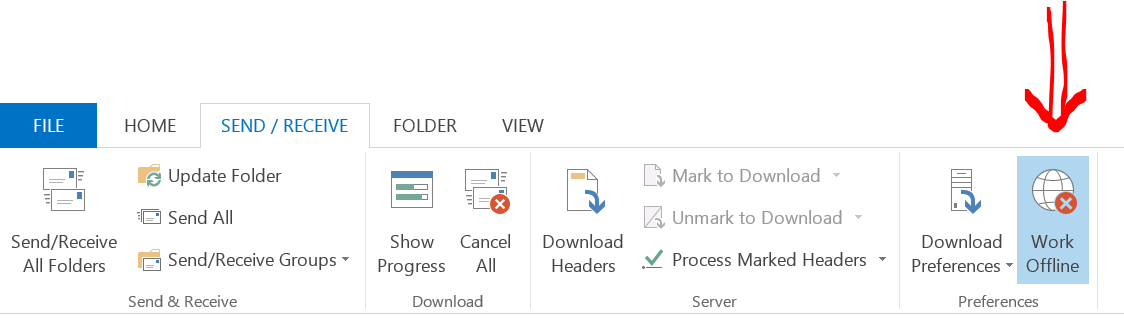
In Outlook 2013 you can achieve this by turning on the "Offline mode"!
Accessible from the Send/Receive tab it tells Outlook to stop sending and receiving new mail while allowing to access old e-mail and prepare new email to be sent after the brain work is done.
Here is where you can find the button in Outlook 2013
This is the icon of Outlook indicating that offline mode is ON
To turn if off, simply press the Work Offline button again
 |
The reason for most of the interruptions in an office is a new e-mail in the inbox. It's almost automatic, you look at the e-mail, take time to decide if it should be read and answered. By doing this you loose your focus and lots of psychic energy.
So first thing to do when starting a brain work is to block new e-mails from coming, while being able to read old e-mail and write new one.
In Outlook 2013 you can achieve this by turning on the "Offline mode"!
Accessible from the Send/Receive tab it tells Outlook to stop sending and receiving new mail while allowing to access old e-mail and prepare new email to be sent after the brain work is done.
Here is where you can find the button in Outlook 2013
This is the icon of Outlook indicating that offline mode is ON
 |
| Offline is ON |
To turn if off, simply press the Work Offline button again
A bientot
Frank Contrepois
09/03/2015
How do I print long documents in OneNote as a continuous paper?
Check this blog article (http://blogs.msdn.com/b/johnguin/archive/2012/12/27/tip-printing-long-documents-to-onenote.aspx)
06/03/2015
"Live by your values, pursue your goals to achieve your mission in life"
Hi all
"Live by your values, pursue your goals to achieve your mission in life" - Frank Contrepois
Finding your values, mission and goals is a great way toward a better life. Here is why you should search yours now.
Values are the filter your action need to go through to be good ones. You have values, coming from education, tradition, family and experience. You might not have a list of them but you have them. Values help you make decisions every day and shape your day and how others see you. Finding the most important values allow you to make YOUR right decisions, the ones that you'll accept and that will not leave any regrets.
Find them, share them, live them.
My values are:
Mission is next. I do not mean a James Bond style mission, I mean a life mission, one or more statements that define your life goal. Following your mission might requires courage, patience, perseverance (all are great values to have), it needs to be valid for a life.
By following your mission you'll have the energy to do, the commitment to succeed and the recognition of others. Having your mission clear help other understand you and your actions. It helps finding the right persons and find a job that align with your ultimate goal.
My mission is: "Live and share a happy and balanced life between family, new achievements and continuous improvements"
The short version is "No WOW is left behind": which explain that for life and work I'll be there for the most important moments not matter what.
Goals, present a shorter timeline toward your mission. A kind of what's next on the road. I recommend choosing goals with a 1 year, 3 years and 5 years horizon and try to align your activities to them. You should have goals for life, work and community (The triple bottom line) and make them hard to reach but in line toward your longer term goals and ultimately your mission.
I share my family goals only with my wife, my work goals with my wife, collegues and some friends, my community goals with everyone.
My community goals are:
"Live by your values, pursue your goals to achieve your mission in life" - Frank Contrepois
Values are the filter your action need to go through to be good ones. You have values, coming from education, tradition, family and experience. You might not have a list of them but you have them. Values help you make decisions every day and shape your day and how others see you. Finding the most important values allow you to make YOUR right decisions, the ones that you'll accept and that will not leave any regrets.
Find them, share them, live them.
My values are:
- Trust - to build long term relashionship
- Honesty - I believe in what I say
- Improvement - to evolve, survive and be a better person
- Sharing - as in team work
- Fair - I understand others views
- Open Minded - I believe in the brain and actions as the way to value people
Mission is next. I do not mean a James Bond style mission, I mean a life mission, one or more statements that define your life goal. Following your mission might requires courage, patience, perseverance (all are great values to have), it needs to be valid for a life.
By following your mission you'll have the energy to do, the commitment to succeed and the recognition of others. Having your mission clear help other understand you and your actions. It helps finding the right persons and find a job that align with your ultimate goal.
My mission is: "Live and share a happy and balanced life between family, new achievements and continuous improvements"
The short version is "No WOW is left behind": which explain that for life and work I'll be there for the most important moments not matter what.
Goals, present a shorter timeline toward your mission. A kind of what's next on the road. I recommend choosing goals with a 1 year, 3 years and 5 years horizon and try to align your activities to them. You should have goals for life, work and community (The triple bottom line) and make them hard to reach but in line toward your longer term goals and ultimately your mission.
I share my family goals only with my wife, my work goals with my wife, collegues and some friends, my community goals with everyone.
My community goals are:
- Selling a book presenting a framework of how to maintain a life/work balance
- Receive a prestigious award for my contribution to the world
- Receive more than 1'000'000 positive feedback from my activities
As an example, this blog is due to the need to improve my writing skills to write the book and achieve 1'000'000 positive feedback. Comments on blog count, so don't hesitate
In conclusion, we all have values, we all have a mission and goals, but writing them down and sharing them will expand their reach and will help you live a better live.
NB: Finding values, mission and goals is not easy and take time and mind power, so patience.
Reading related to the post:
GTD and the altitude view
7 Habits to help on the mission creation
28/02/2015
Changing mindset between work and home
I often work from home, and one of the hardest thing to do is to move from a work mindset to a home one. If you're in the office you have the commute, the last chat with colleges or the pint at the pub. (I live in London at the moment) and avoid this

So how do you move from work to home? Specially when you're working from home or receive work call while reaching home?
I've discovered (and probably read) that the brain focus on the present, even if the present is irrelevant, and forgets about the past, even if important.
So during my transition, I do mind emptying activities like games, or mind filling things, like reading a fiction book. This helps the brain disconnect from the work and move into home with a smile.
That's what happened yesterday, I came back from work in a "home sweet home" mindset, but received a work phone call with adrenalin triggering news that made the transition more complicated.
To accelerate the transition I played "Alto's adventures" and my wife joined me and we ended up laughing at how bad we are and enjoying each other -rare- successes. After that it was time to sleep and so the blog stayed empty on Friday but is now filled with something interesting.
And you, how do you move from work to home mindset? Are you someone who manage this transition easily; do you ever make this transition; do you use a trick like me?
Have a great weekend!
24/02/2015
How do I extract MSI files
msiexec /a test.msi /qb TARGETDIR=c:\tmp
to extract test.msi content in the c:\tmp directory
to extract test.msi content in the c:\tmp directory
21/02/2015
How do I deploy ESXi in 10 minutes? A great video
How do I deploy ESXi in 10 minutes?
Bonus vCenter Operation Manager. I think now the product has a new name... but the video is still cool
20/02/2015
How keep your new year resolution? Share!
Hello everyone!
Today is Friday, and as every Friday in the last month I'm writing a blog article.
Today's article is special, it exists because a friend told me "It's Friday, I'll have something to read in your blog".
Oups, today has been a complicated day, with lots of work, stress and unexpected things, I had completly forgot about the blog, but now I HAVE to write an article, because you (at least one of you) is waiting for it.
Sharing your goals, your resolutions, creating anticipation will help do things! I've made a promise to someone, and I keep my promises, so here I am, writing this short article.
This concept can be applied to many things and it helps committing and after lots of forced commit, you'll have a new habit. I hope that in some month, writing something on my blog will be as natural as brushing my teeth!
less than 10 minutes to write and I feel better with myself, try it, it works.
If you have ideas or examples to add to this article, write them in the comments.
a bientot
Frank
Today is Friday, and as every Friday in the last month I'm writing a blog article.
Today's article is special, it exists because a friend told me "It's Friday, I'll have something to read in your blog".
Oups, today has been a complicated day, with lots of work, stress and unexpected things, I had completly forgot about the blog, but now I HAVE to write an article, because you (at least one of you) is waiting for it.
Sharing your goals, your resolutions, creating anticipation will help do things! I've made a promise to someone, and I keep my promises, so here I am, writing this short article.
This concept can be applied to many things and it helps committing and after lots of forced commit, you'll have a new habit. I hope that in some month, writing something on my blog will be as natural as brushing my teeth!
less than 10 minutes to write and I feel better with myself, try it, it works.
If you have ideas or examples to add to this article, write them in the comments.
a bientot
Frank
13/02/2015
How do I connect to vCenter using powerCLI
C:\PS>Connect-VIServer -Server vcenter01 -User admin -Password pass
another option that will use your current username and password settings
C:\PS>Connect-VIServer -Server vcenter01
Reference vmware
another option that will use your current username and password settings
C:\PS>Connect-VIServer -Server vcenter01
Reference vmware
11/02/2015
How do I parse JSON documents from PowerShell
PowerShell starting from version 3.0 has a ConvertFrom-Json and a ConvertTo-Json cmdlet
References:
References:
- TechnetBlog - heyscriptingguy <- Fantastic blog with explanation, including from web
- Technet
How do I get the version of PowerShell I'm using
I use $PSVersionTable.PSVersion
PS C:\Users\Frank> $PSVersionTable.psversion Major Minor Build Revision ----- ----- ----- -------- 2 0 -1 -1
PS C:\Users\Frank> $PSVersionTable.psversion Major Minor Build Revision ----- ----- ----- -------- 2 0 -1 -1
This is version 2.0 (old)
06/02/2015
Backstage of the Moving think tank - Sections and mindmap
I write this blog because I love Sharing and it's also one of my values. I want to share the positive things, the experiences and new discoveries.
Every Friday I'll post something, might be long, might be short, but I'll write on Friday.
Ideas of sections and topics are organized as a mindmap

Here is an explanation of every section and what I might write about. If you', my readers have preferences, please write it in a comment.
Reading Info is a section about pairs of posts about article in newpapers. One post is for what I think the article will talk about from the title and the second post will be about what are my comments and correction after reading the article.
Honesty. I really care about Honesty because I've been honest in a country where dishonesty is rewarded. I truly believe that a honest company has a competitive advantage, so I'm investigating various business model around honesty.
Work, should be called technical, it's all the ideas and thoughts coming while at work or related to work. By being in Virtustream, those thoughts are often around cloud, security and consumption based computing
Thinking is the big catchall bucket of ideas.
- At the moment I've interesting post around how to better know your personality, in particular the "MBIT" method.
- I have some fun thinking about how we dress and which combinations of dress are standard (shirt and jeans) which are ok (Jacket and jeans), which are a no (jacket and shorts).
- Education is a big one for me. Schools and college are not in sync with the current world. A simple example, we all have to go to meetings but there is no training at school. There are different ways of thinking and being, of personalities while school only rewards some type of and leave the others behind. The most viewed TED presentation is about education
- Strange investigates the things we take for granted and shake them a little to understand if there is really something behind. For example, why is dessert always a the end of a meal, could it be at an "antipasti"?
Productivity is my passion, I'm lazy and don't like to do the same thing multiple time. I use GTD as a methodology to remember what to do but also all the promises made to a customer. I always try to find a better use of tools in my life :)
How do I? is a section where I present solutions to problems I've solved. Problems can be technical IT, productivity or anything else. Probably short posts
Thanks to read :)
a bientot
02/02/2015
3 usual mistakes done while writing a todo list
You (as me) have tried to organise your work with todo lists. You also discovered that they tend to work for a week and then be ignored or forgotten or not updated! I'd the same issue too. Until I read "Getting Things Done" (GTD) 5 years ago. Since then, my todo lists are organized, useful and they help me keep my brain free of things to remember. Beware, you and I do not live in a perfect world, todo lists require regular reviews and you can always try to improve them.
All 3 mistakes have a solution, and a good todo list apply all 3 solutions, but solving the main issue is a good start.
Lets do it, take your last todo list, if it's full of non done stuff, read solution 1, if it's less than 10 todo then solution 2 is for you, if it's a looooong list, solution 3 will help.
1) List of the things I should have done - the procastination effect
This problem can be solved by writing on my todo list, not the final goal but the next physical action to do. In the case of the lamp, I would write on the todo list "Check the type of batteries for the lamp" when that action is done I would write "Put to buy aaa batteries on the supermarket list"
2) Very little list with elements with very big todos. E.g. "Conquer the world"
Actions need to be doable, actions need to be well defined and how they end should be easy to visualize or for other to understand
3) Very very long list - maybe correct but probably too detailed
The rule is that every action that requires less than 2 minutes to be done should be done immediately. So for example I will get all what is needed to write a letter by following the 2 minutes rules and an action named write a love letter to <wife's name>, instead of "find paper", "find pen", "check calendar for date"....
What was not working with my list?
1) List of procastination. I should do what is on the list, but I don't know exactly how to do it, or I miss some information to do it and I forget to get it.
A classic example would be "Check the boiler" but I cannot see the boiler until I've a lamp, but the batteries in the lamp are dead and I'll buy them coming back from the office. The last action never happen, coming back from the office, I might think about dinner, I might think about work, but I surely don't think about boiler or batteries.
2) Todos are to generic, it's not a single action but a multitude of actions summarized in one sentence. Just reading it makes you feel tired. It's natural, given a goal, your brain will fill the gaps between NOW and where this action end, and if the final action is far away, there is a lot to to do and your brain try to visualize all the actions at the same time. Ouf.
3) It takes more time to write in the list than to do them, result: a never ending list, with lot of details.
Example of such a list: "Write love letter to wife" becomes "find pen"; "take pen", "find paper".... .
Summary:
In your todo list write action that are
Physical activities
With a clear end
Takes more than 2 minutes to do
Tricks:
Use physical verb to start a todo element. instead of "Thinking about vacation destination" use "List potential vacation destinations"
Describe the action. instead of "comment blog" write "comment on the moving think tank blog
Read the next blog post as we'll continue to improve the todo list
a bientot
Frank
All 3 mistakes have a solution, and a good todo list apply all 3 solutions, but solving the main issue is a good start.
Lets do it, take your last todo list, if it's full of non done stuff, read solution 1, if it's less than 10 todo then solution 2 is for you, if it's a looooong list, solution 3 will help.
1) List of the things I should have done - the procastination effect
This problem can be solved by writing on my todo list, not the final goal but the next physical action to do. In the case of the lamp, I would write on the todo list "Check the type of batteries for the lamp" when that action is done I would write "Put to buy aaa batteries on the supermarket list"
2) Very little list with elements with very big todos. E.g. "Conquer the world"
Actions need to be doable, actions need to be well defined and how they end should be easy to visualize or for other to understand
3) Very very long list - maybe correct but probably too detailed
The rule is that every action that requires less than 2 minutes to be done should be done immediately. So for example I will get all what is needed to write a letter by following the 2 minutes rules and an action named write a love letter to <wife's name>, instead of "find paper", "find pen", "check calendar for date"....
What was not working with my list?
1) List of procastination. I should do what is on the list, but I don't know exactly how to do it, or I miss some information to do it and I forget to get it.
A classic example would be "Check the boiler" but I cannot see the boiler until I've a lamp, but the batteries in the lamp are dead and I'll buy them coming back from the office. The last action never happen, coming back from the office, I might think about dinner, I might think about work, but I surely don't think about boiler or batteries.
2) Todos are to generic, it's not a single action but a multitude of actions summarized in one sentence. Just reading it makes you feel tired. It's natural, given a goal, your brain will fill the gaps between NOW and where this action end, and if the final action is far away, there is a lot to to do and your brain try to visualize all the actions at the same time. Ouf.
3) It takes more time to write in the list than to do them, result: a never ending list, with lot of details.
Example of such a list: "Write love letter to wife" becomes "find pen"; "take pen", "find paper".... .
Summary:
In your todo list write action that are
Physical activities
With a clear end
Takes more than 2 minutes to do
Tricks:
Use physical verb to start a todo element. instead of "Thinking about vacation destination" use "List potential vacation destinations"
Describe the action. instead of "comment blog" write "comment on the moving think tank blog
Read the next blog post as we'll continue to improve the todo list
a bientot
Frank
25/01/2015
A powerful cocktail: "Free speech and hypocris"

It reminds me of this french strip

Dictatorship is shut up, Democracy is talk, talk....
Free speech means you can talk, not that you'll be listen to
As everyone you will most likely listen to what you agree with, an explanation that strengthen your beliefs, or a promise that someone else will solve your problems.
Politicians and marketers have learned this all too well:
- Vote for me and I'll give you a job
- Buy my brand (clothe, cars, perfumes, jewels,...) and all your social problems are solved, beautiful men/women will search you.
Think about it
- Book - Influence: The Psychology of Persuasion by Robert Cialdini
- Link - 8 subconscious mistakes our brains make every day and how to avoid them
22/09/2012
Sorry
Scusate tutti, mi sono trasferito a Londra e devo dire che la priorita' del blog era sotto:
- un tetto
- procaciare il cibo (individuare supermercati)
- iniziare il nuovo lavoro
Ci siamo, sono tornato in vita, ora devo vedere se ho qualcosa da dire al mondo (non che il mondo stia in apprensione)
Ciao
Frank
04/11/2011
Un portale è come un negozio di vestiti
Buondi a tutti e bentornati alla serie informatica con analogie di Frank Contrepois
In questo post cercherò di spiegare come il personale necessario per la creazione e manutenzione di un portale possa essere collegato al personale equivalente di un negozio di vestiti.
In primis esiste solo il vuoto totale, molto light, niente negozio, magari una strada ma nulla di più
FASE 1 - Costruzione
Arriva il primo attore, l'architetto assieme ai muratori che dal nulla fanno apparire un negozio di calcestruzzo, con i fili dell'elettricità che penzolano, i tubi delll'acqua con rubinetti basilari ecc...
Nel mondo informatico questi ruoli sono solitamente ricoperti da un architect e uno o più sistemisti che gestiscono i server, installano i sistemi operativi e se necessario gli application server senza nulla dentro.
Fase 1 finita: abbiamo un negozio brutto e vuoto ma quantomeno esistente.
Nel mondo informatico abbiamo dei server accesi e funzionanti con un software di portale ma senza contenut
FASE 2 - Il colore
Dopo architetto e muratori eccovi il Decoratore ( o architetto d'interni) e pittori/elettricisti/idraulici...
Il decoratore sceglie i colori, le lampade eventualmente i rubinetti e tutti gli accessori necessari ad un negozio per potersi chiamare cosi. I vari specialisti si occupano poi di creare realmente quello che è stato scelto dal decoratore.
Nel mondo informatico il decoratore viene chiamato "specialista UX" dove UX sta a rappresentare l'interazione con l'utente finale. Questo personaggio definisce la grafica: la posizione dei menu, i colori principali (la palette) i posizionamenti in prima pagina e per ogni altro tipo di pagina (articoli, recenzioni, profili utente, forum, ecc...). Il risultato è un cosidetto "blueprint" che permette ai programmatori html/css di creare le pagine web base per ogni tipo di pagina; ai programmatori di creare la logica richiesta per salvare i dati utente, aggiungere dati, estrarre dati e inserirli nelle pagine html.
Fase 2 finita: abbiamo un bel negozio con tutti gli accessori ma ancora vuoto di vestiti.
Nel mondo informatico abbiamo un portale attivo con pagine pronte eventualmente con dati di prova ma nessuna informazione realmente utile
FASE 3 - il contenuto
arriviamo alle cose serie, ora bisogna riempire il negozio di vestiti, di gusto, corrispondenti alla clientela che prevediamo di servire. Vanno quindi trovati i fornitori, i vestiti adatti e la posizione di ogni capo all'interno del negozio. Quest'ultima parte è critica in quanto vanno scelti i capi da mettere in vetrina, su i manichini e sono in carico al responsabile del negozio ecc... Spesso a questo punto vengono richiamati gli attori precedenti per ritocchi.
Nel mondo informatico i vestiti sono gli articoli, che vanno selezionati da vari fornitori "la redazione" e per ogni articolo va scelto se metterlo in prima pagina, renderlo visibile a tutti o solo agli utenti registrati (paganti ?) compito che spetta al proprietario del portale - portal owner . La grafica può essere rivista a questo punto in modo lieve per rendere il tutto più attraente
Fase 3 finita: abbiamo un negozio pieno di vestiti che può aprire.
Nel mondo informatica abbiamo un portale con i primi contenuti e con una grafica accativante
FASE 4 - La vendità
Il negozio apre le sue porte con i commessi che aiutano i clienti e i capi che vengono sempre aggiornati grazie ai contatti fatti nella fase 3.
Nel mondo informatico gli utenti si inscrivono, leggono articoli commentano e la redazione controlla i contenuti, aggiunge articoli e foto al portale.
FASE 5 - la manutenzione
A questo punto gli attori delle fasi 1-3 vengono richiamati in base alle necessità, per esempio in periodo natalizio è possibile richiamare l'architetto d'interni e relativi collaboratori per una decorazione particolare. Si richiama l'architetto per cambiare la struttura del negozio, per un trasloco i vari idraulici/elettricisti vengono chiamati per riparare ai piccoli danni che succedono in ogni tipo di negozio.
Nel mondo informatico gli attori delle fasi 1-3 vengono richiamati in base alle necessità, per esempio in periodo natalizio viene richiamato il grafico per una grafica rossa e bianca, mentre i programmatori lavorano sempre per aggiungere nuove funzionalità al portale, i sistemisti si occupano di controllare che il portale funzioni correttamente e intervengono in caso di aggiunta di server (per esempio)
Fase 5 finita: si ricomincia alla fase 3 con i nuovi vestiti alla moda ecc...
Nel mondo informatico il portale va riempito di contenuti e articoli
Riassunto
Architetto = Architect
Muratori = Sistemisti
Decoratore = Specialista UX
Pittori/idraulici... = Programmatori html/css/java...
Cliente = Utente
Fornitori = Redazione
Responsabile del negozio = Proprietario del portale
Commessi = Redazione (di solito)
26/10/2011
La pigrizia è una virtù
Essere pigri è una vera benedizione, sopratutto in informatica.
Essere pigri permette di lavorare meno e di essere considerati un GURU cosa che permette di lavorare ancora meno e solo su argomenti interessanti.
Essere pigri permette di lavorare meno e di essere considerati un GURU cosa che permette di lavorare ancora meno e solo su argomenti interessanti.
Ecco alcune spiegazioni sulla filosofia del pigro:
Il pigro
- non vuole rifare le cose più volte;
- non vuole re-inventare la ruota;
- Cerca soluzioni semplici (KISS)
- non vuole essere svegliato di notte;
- non vuole passare ore a cercare dove sta un problema
Il pigro quindi, lavora a pieno ritmo per tempi brevi per conseguire gli obiettivi di cui sopra.
Mi considero un grande pigro.
Non ripetere le stesse azioni
Per non ripetere le stesse azioni ho studiato le "espressioni regoli" e i programmi vim e sed che mi permettono in modo rapido di "Estrarre da 10GB di log di Oracle le query che richiedono più di 5 secondi. Le query sono multirighe e il tempo impiegato è scritto alla fine". Vi garantisco che consegnare il lavoro in meno di una giornata (in realtà 30 min ma non bisogna essere troppo efficenti) mi ha fatto guadagnare molti punti con il DBA.
Di esempi cosi ne ho tantissimi e oltre a permettere di riposare vi garantiscono lo status di guru!
Non reinventare la ruota
Se vi si chiede qualche cosa che sentite come complicato, prima di partire in quarta, cercate online o altrove se non esiste, un'idea, un prodotto, una persona o un oggetto che faccia su per giù quello che vi serve. Sfruttare il lavoro degli altri è spesso meglio che partire alla scoperta. I pionieri spesso non arrivano a destinazione.
Internet e le reti informatiche sono tutte facilmente paragonabili ai servizi di comunicazione a distanza, esistenti da quando è stata inventata la scrittura (e la lettura ;) I concetti base sono sempre gli stessi sia che il mezzo trasmissivo venga fatto da uomini, cavalli, segnali di fumo, computer.
Si tratta di trasmettere un'informazione tra punti distanti ovviando alle limitazione fisiche del mezzo trasmissivo con tappe intermedie che (cercano) di avvicinare il messaggio integro sempre più vicino alla sua destinazione finale :
uomini: quando non ce la fai più a correre o passi il messaggio ad un prossimo messaggero
cavalli: il poney express prevedeva delle tappe per permettere ai cavalli di riposare
segnali di fumo: ci sono sempre vari indiani sulle classiche montagne piatte dei canyon impegnati a ripetere il messaggio per farlo arrivare a destinazione
computer: i cavi hanno una lunghezza massima e sono i cosiddetti router che si occupano di trasmettere il messaggio sempre più vicino alla destinazione
KISS
KISS è un acronimo dell'esercito inglese (si si lo so che è anche un gruppo rock) che basato su i sani principi della pigrizia individua nelle soluzioni semplici le migliori e più eleganti soluzioni.
Parlando di eleganza prendiamo ad esempio lo sciaquone : se dovesse essere inventato oggi sicuramente verrebbe usato l'eletricità mentre grazie ad una "semplice" forma dello scarico compie il suo lavoro grazie alla pressione dell'acqua, funziona anche senza corrente (anche se mirare è problematico) e con acqua calda o fredda!
In generale cercate di usare una soluzione semplice vi tornerà utile per il futuro, per replicare, spiegare, migliorare.
Non essere svegliato di notte
Questo obiettivo è il fondamento di una nuova (più o meno) metodologia di gestione dei sistemi e architetture che cerco di mettere in piedi per diventare un super guru della pigrizia.
In informatica per non essere svegliato di notte bisogna:
- Controllare che tutto funzioni bene prima di andare a dormire. Non controllate tutto a mano, seguite il punto uno e automatizzate il tutto, voi dovete solo leggere una mail ogni sera.
- Avere scritto la documentazione necessaria per permettere alla guarda notturna di risolvere senza svegliarvi
- O non farsi dare le reperibilità notturne! Li entriamo nella capacità di spadulare o raggirare paduli non attinenti a questo documento
Non perdere tempo a cercare un problema
Se un problema si presenta e vi tocca risolverlo allora il vostro obiettivo è di indicare che la soluzione richiede minimo 4 ore, risolvere in 30 minuti e "pigrare" per 3 ore 30 minuti. Per raggiungere questo scopo è necessario organizzare i vari aspetti del vostro sistema (grande o piccolo che sia) in livelli. Ogni livello comunica solo con il livello sopra e quello sotto ed esegue una quantità limitata di azioni.
L'uso di questo sistema permette di individuare il livello del problema velocemente. Essendo il livello limitato nelle cose che sa fare trovare il problema non può essere troppo complicato (anche se...) .
Per convalidare quanto detto vi garantisco che quasi tutti i sistemi informatici seguono questa filosofia di vita: tutta l'informatica è fatta a strati, copiano la vita reale o idee precedenti, cercano di semplificare le cose, automatizzano tutto (o quasi) e funzionano 7/7 h24 per non farci svegliare.
Conclusione
Siate pigri ma commentate grazie :-)
03/10/2011
Reset all Google Chrome info
Hello,
as a IT teacher I work in various classrooms in various places. I like to use the Google Chrome sync to have all my datas with me but want to remove them at the end of the day or course. I couldn't find any option to do this so here is the way to remove all your google chrome infos:
simply delete the folder
%LOCALAPPDATA%\Google\Chrome\User Data\default
%LOCALAPPDATA%\Google\Chrome\User Data\default
the folder will be recreated on new Chrome start
Subscribe to:
Posts (Atom)

 Posts
Posts


